KY3 Weather
- 4.6
- Rating
- 500.00K
- Installs
- Free
- Price

 Analysis by App-foxy
Weather apps are easy to judge when the sky is clear, but their real value appears when plans are changing quickly. I spent time with KY3 Weather as a local weather app from Gray Media, and the part that stood out most was its focus on turning a regional forecast into something I could check quickly before leaving home. It is free, rated for Everyone, and available for Android devices running Android 9 or later, so it is aimed at ordinary daily use rather than a specialist audience.
That local focus matters. A large national weather service can cover almost anywhere, but it can also feel broad and less connected to the place where I actually live. KY3 Weather is built around the KY3 Storm Team, which gives the app a more regional identity. In my experience, that makes it most useful when I want a practical answer to a simple question: should I leave now, delay the trip, or prepare for a change later?
Why the local forecast is the app’s most useful capability
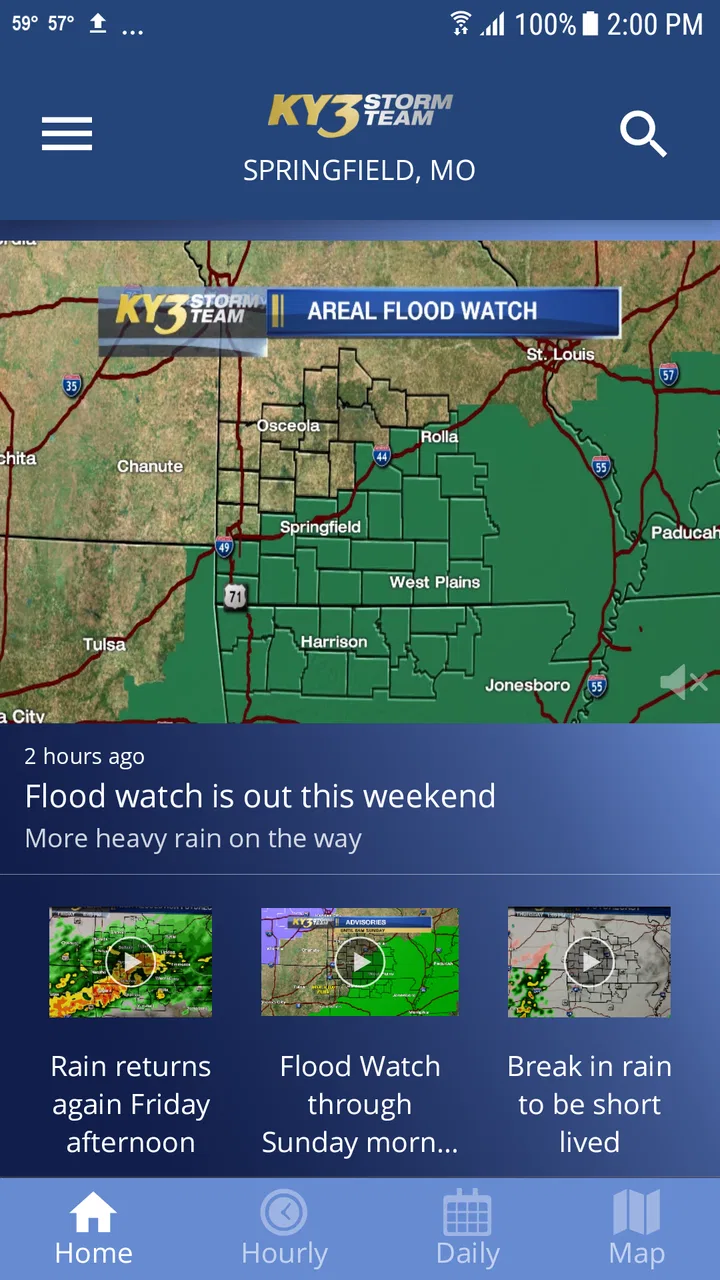
The app’s main strength is not that it replaces every weather tool on a phone. Its strength is that it gives a local forecast a prominent place in the experience. That sounds modest, but it changes how I use it. Instead of opening a general-purpose weather service and searching through several layers of information, I can treat KY3 Weather as a quick regional check before commuting, driving, walking the dog, or deciding whether outdoor plans are sensible.
You May Also Like

 Blood Strike: 2.5 Anniversary
Blood Strike’s Loadouts Turn Every Drop Into a Tactical Gamble
A close look at Blood Strike’s custom loadouts: how fast access to signature weapons reshapes its battle royale rhythm, rewards preparation, and narrows the gap between fights.

 Pandora - Music & Podcasts
Pandora’s Music Is Easy to Start, but Harder to Recover
Pandora’s strength is its low-effort path from a seed to a station. Its weak spot is how much confidence it asks you to place in connection, setup, and quiet recovery.

 8 Ball Pool
 Is Built on Rivalries, Rematches, and Routine
A close look at the rivalries, rematches, shared routines, and unanswered safety questions that turn a quick pool match into a persistent mobile community.

 Samsung Music
’s Quiet Strength Is Playing What You Already Own
Its reach comes less from spectacle than from dependable access to a personal library. That simplicity is both the app’s strongest retention engine and its ceiling.

 AccuWeather: Weather Radar
AccuWeather Review: A Quick, Clear Forecast for Everyday Decisions
For everyday plans, the best forecast is the one you can understand quickly. AccuWeather makes rain timing, radar, and local conditions easy to act on, with a few trade-offs.

 Hill Climb Racing
Why Hill Climb Racing Still Turns Crashes Into One More Run
A tiny car, a bumpy hill and one more upgrade: Hill Climb Racing keeps resurfacing because its simple chaos makes every near-miss feel personal.
More From Our News Desk



That approach is especially helpful for people whose weather decisions are tied to one area. If I am checking conditions for a familiar home, workplace, school, or regular route, a local presentation feels more relevant than a worldwide forecast interface filled with places I never visit. The app’s identity is closely connected to the KY3 Storm Team, so it feels designed for people who want weather information with a local broadcast perspective rather than a purely generic utility.
I would not describe it as a complete replacement for every alternative. A broad weather platform may be better for someone who travels constantly, compares conditions across many cities, or wants a highly specialized view. KY3 Weather makes more sense when the question is local and immediate. That distinction is important because it prevents disappointment: this is most valuable as a dependable regional companion, not necessarily as the only weather source for every kind of trip.
The app has been available since September 22, 2011, and the current release is version 6.1.701. That long presence gives it the feel of an established local product rather than a newly launched experiment. Its audience is also substantial, with more than 500 thousand installs, an average rating of 4.5 from around 12 thousand ratings, and roughly 3.3 thousand written reviews. I see those figures as signs that many people use it as a regular weather reference, although they do not remove the need to judge whether its local emphasis matches my own habits.
What the local emphasis changes in everyday use
When I open a weather app before work, I usually do not need a lecture about meteorology. I need to know whether a jacket, umbrella, extra travel time, or a change of plans is sensible. A local app can reduce the distance between the forecast and that decision. KY3 Weather is well suited to this kind of short interaction because its purpose is clear from the moment I launch it: check the weather around the area served by the KY3 Storm Team and move on with the day.
That clarity is also useful for family members who do not want to learn a complicated forecasting interface. Someone checking the weather before taking children to school, an older relative preparing for an appointment, or a neighbor planning outdoor work can benefit from a focused app that does not demand much setup or interpretation. The Everyone content rating reinforces that broad accessibility, although ease of use still depends on how comfortable each person is with mobile apps.
My practical advice is to use it as part of a routine rather than only during severe weather. Checking once in the morning helps with clothing and travel. Checking again before leaving work helps catch changes that matter later in the day. This habit is more useful than opening the app repeatedly without a specific decision in mind, because the local forecast becomes connected to real actions.
How I would use it in practice
The most effective workflow is simple: open the app, look at the local conditions first, then examine the forecast far enough ahead to cover the activity I am planning. For a commute, I would check before leaving and again before the return journey. For outdoor work, I would look beyond the current moment so that a comfortable start does not create false confidence about the rest of the task.
This is one of the less obvious benefits of a focused weather app. It encourages a decision-based check instead of endless browsing. I am not opening it to compare dozens of locations or explore weather maps for entertainment. I am opening it because I need to decide whether to carry rain gear, leave earlier, move an activity indoors, or wait before starting a job outside.
A useful habit is to separate “current comfort” from “planning risk.” The current conditions may look fine while the forecast later affects a school pickup, a long drive, or an outdoor appointment. I would first use the app for the immediate situation, then deliberately look ahead to the time when I will be most exposed. That two-step check helps avoid the common mistake of treating pleasant weather at the moment of opening as a guarantee for the whole day.
Another practical tip is to check the app from the same location before judging whether it fits your routine. Local weather needs are personal. A person living near one part of the regional coverage area may care about conditions that differ from someone farther away. I would give it several normal days, including at least one day when the weather changes, before deciding whether its local presentation is useful enough to keep as my primary weather shortcut.
A realistic morning and evening routine
Imagine a weekday morning with a short drive, a school drop-off, and outdoor work planned for the afternoon. I would open KY3 Weather while getting ready, check the local conditions, and then look at the later forecast before choosing clothing and deciding whether the outdoor job should begin early. Before leaving work, I would check it again rather than relying on the morning impression. That second look is important because plans often last longer than the first forecast check.
For a weekend event, I would use a slightly different workflow. I would check the app before committing to the plan, then check again shortly before leaving. If the activity involves a long drive, I would not assume that the weather at home represents the entire route. In that situation, I would pair KY3 Weather with another service that covers multiple locations more conveniently. This is a good example of using the app intelligently instead of expecting one local tool to answer every question.
For outdoor workers, the app is most useful as a planning aid rather than a safety guarantee. I would use it to decide when to inspect conditions, whether to prepare an alternative task, and when to check again. I would still use personal judgment and any official emergency information available during dangerous conditions. A weather app can support a decision, but it should not become the only basis for a high-risk one.
Questions about setup and everyday suitability
Because the app is free, the barrier to trying it is low. I would recommend installing it first for anyone who regularly follows the KY3 service area and wants a dedicated local weather option without paying. The minimum requirement of Android 9 or later means people with older phones should check compatibility before planning around it. On a supported Android device, its appeal is strongest when the phone is used mainly for local daily decisions rather than extensive travel.
The app is also a reasonable choice for a household that wants a straightforward weather reference shared across different ages. The Everyone rating makes it broadly suitable from a content standpoint, and the local focus gives family members a common place to check conditions. I would still encourage each person to learn what the forecast means for their own plans instead of treating a single symbol or temperature as the complete story.
One question a potential user may have is whether the app is worth keeping if another weather service is already installed. My answer is: only if its local focus improves your routine. If the existing service already gives you the local information you need and you travel frequently, adding another app may create clutter rather than value. If you prefer the KY3 Storm Team’s regional presentation or want a dedicated shortcut for local checks, the duplication can be justified.
Tradeoffs I noticed before recommending it
The same local focus that makes KY3 Weather convenient can limit it for some people. A frequent traveler may find a broader weather platform more efficient because it is designed around many cities and destinations. Someone planning a road trip may also prefer an app that makes it easy to compare several points along a route. KY3 Weather is better suited to a home region and recurring local decisions than to constant movement.
There is also a difference between wanting a forecast and wanting a full weather workstation. If I need highly detailed analysis, specialized outdoor information, or a wide range of technical layers, I would look at a more advanced service. KY3 Weather’s value is its directness. The tradeoff is that a simpler, locally oriented experience may not satisfy someone who enjoys examining every possible weather detail.
Another limitation is behavioral rather than technical: a local app can encourage overconfidence if I stop checking beyond my immediate surroundings. For a neighborhood errand, that may be fine. For a long drive, a hike, or an event spread across several areas, I would use additional sources. The right way to use this app is to match its local strength to a local question and recognize when the question has become regional or national.
I also would not install it solely because it has a strong rating. An average of 4.5 is encouraging, and the volume of ratings shows meaningful use, but ratings cannot predict whether the app’s local coverage and style fit every phone owner. I would judge it by how quickly I can turn its forecast into a decision. If I keep opening another service afterward to answer the same question, KY3 Weather is not doing enough for my particular routine.
How it compares with common alternatives
Compared with a general phone weather widget, KY3 Weather offers a more deliberate destination for local checking. A widget is excellent for speed, especially when I only need a glance. The dedicated app is more useful when I want to pause and consider the forecast in relation to a plan. I would keep a widget for instant awareness and use KY3 Weather when the decision matters enough to deserve a closer look.
Compared with a large national weather app, the difference is emphasis. National services usually win for travel, multiple saved locations, and broader comparison. KY3 Weather wins when I care most about the area associated with the KY3 Storm Team and want a regional weather experience. Neither approach is automatically better; the choice depends on whether my life is centered on one area or divided among many.
Compared with a browser search, the app is more convenient for repeated checks. Searching the web can answer a one-time question, but it adds steps and may return a mixture of sources. A dedicated local app gives me a consistent place to begin. I would still use official emergency channels for urgent warnings, but for ordinary planning, the app is less cumbersome than starting from a blank browser page.
Compared with a radar-focused tool, KY3 Weather is likely to appeal more to people who want a general local decision rather than constant storm tracking. If I am watching a storm’s movement minute by minute, I would choose a tool designed around that specific task. If I am deciding whether to carry an umbrella or reschedule yard work, the local weather app is the more natural starting point.
Who will get the most from it
I would recommend KY3 Weather most strongly to people who live in the KY3 Storm Team’s regional audience, check weather several times during a normal day, and prefer a focused local app over a crowded national platform. It is also a good fit for families, commuters, students, and outdoor workers who need weather information to support ordinary decisions without turning forecasting into a hobby.
It is less suitable as a sole weather solution for frequent travelers, road-trip planners, and users who want specialized technical detail. Those people may be happier with a broader service, perhaps keeping KY3 Weather as a local companion when they return home. I would also skip it if I am already satisfied with a built-in widget and do not want another app for the same basic task.
The most useful advanced habit is to treat the app as a trigger for better planning: check before the activity, check again before the return trip, and switch to a broader source when the plan extends beyond the local area. That workflow extracts more value than simply glancing at the current temperature. It also respects the app’s real strength instead of asking it to behave like a completely different kind of weather service.
After using it with that expectation, I see KY3 Weather as a practical, approachable local weather app rather than an all-purpose forecasting laboratory. Gray Media has created something that makes sense for people who want regional weather close at hand, and the free price makes experimentation easy. My recommendation is positive for local users who value a clear daily routine, with one condition: keep a broader or more specialized option available when travel, storm tracking, or detailed analysis becomes the priority.
In short, KY3 Weather earns its place on my phone when the local forecast is the information I act on most often. Its best feature is not complexity but relevance. If your day revolves around one regional area, that focus can save time and make weather checks feel more useful. If your needs are wider, the app is better viewed as a local supplement than as your only source.
FAQs for KY3 Weather
01What features does the KY3 Weather app offer?
The KY3 Weather app provides real-time weather updates, including radar maps, severe weather alerts, and extended forecasts. Users can customize notifications to stay informed about local conditions. The app also features video forecasts and weather news updates, making it comprehensive for planning your day or week.
02Is the KY3 Weather app free to use?
Yes, the KY3 Weather app is free to download and use. However, it may contain ads. There could be optional in-app purchases to remove ads or access additional features, but all essential weather information is available without charge.
03How accurate is the weather information on the KY3 Weather app?
The KY3 Weather app sources its data from reliable meteorological services and local weather stations. While it strives for accuracy, weather forecasts are inherently subject to change. Users should consider the app’s updates and alerts as part of multiple sources when planning around the weather.
04Can I customize weather alerts in the KY3 Weather app?
Yes, the app allows users to customize alerts based on their preferences. You can set up notifications for specific weather conditions such as severe storms, temperature changes, or rain. This feature is particularly useful for staying informed about local weather events.
05What devices are compatible with the KY3 Weather app?
The KY3 Weather app is available for both Android and iOS devices. It requires Android version 5.0 and up, or iOS version 10.0 or later. Ensure your device is updated to these versions or newer to enjoy all the app’s features and receive timely updates.
Pros
- User-friendly interface with easy navigation.
- Accurate local weather updates in real-time.
- Customizable alerts for severe weather conditions.
- Detailed radar maps with multiple layers.
- Minimal data usage for efficient performance.
Cons
- Limited international coverage outside the US.
- Occasional ads may disrupt user experience.
- Requires internet connection for full features.
- Some advanced features need premium access.
- Forecasts can be less detailed on older devices.

KY3 Weather
Gallery